Step by step, timers included
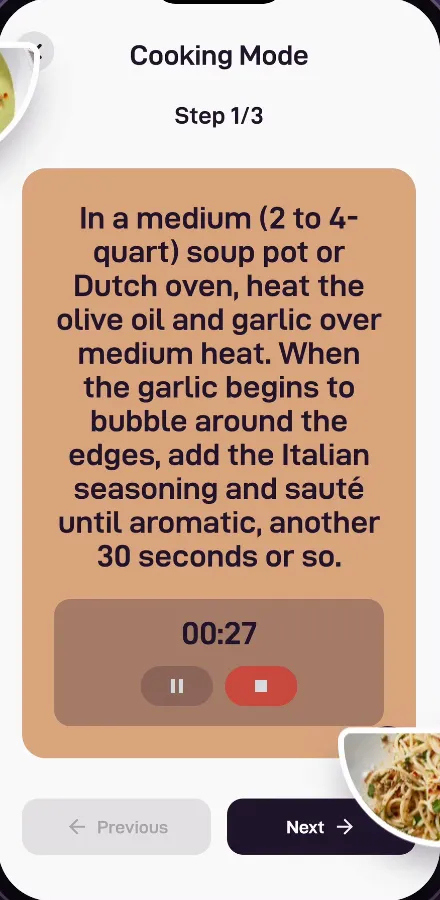
Cook Mode turns any recipe into big, clear steps with a timer right where you need it, so you can focus on the food.



No more scrolling with floury fingers
Recipes on websites make you scroll past adverts and stories to find step four. Cook Mode shows one step at a time, in text big enough to read from across the counter.
Everything you need at the stove
- One clear step at a time, with previous and next buttons.
- Built-in timers: start the timer for a step without leaving the recipe.
- Adjustable servings: double a recipe for guests or halve it for one, and the ingredients scale.
- Ingredients and steps one tap apart, so nothing is missed.
From saved to served
Cook Mode works with every recipe in Bites, whether you saved it from Instagram or TikTok, typed it in yourself or got it from Copilot. And if the recipe is in another language, translate it in one tap first.
Questions, answered
Does Cook Mode have timers?
Yes. Each step can have its own timer that you start and pause right inside Cook Mode.
Can I change the number of servings?
Yes. Adjust the servings and the ingredient quantities scale for you.
Does Cook Mode work with imported recipes?
Yes. Every recipe in Bites, imported or your own, can be cooked in Cook Mode.
Explore more of Bites

Your recipes, finally in one kitchen
Save it, plan it, shop it, cook it. Download Bites and turn tonight’s idea into dinner.